
Sharing your network attached storages to your LXCs in a safer manner
Why it matters:
Security. Compartmentalising all of your containers, by running them without privilege, is an extra step of security in case one of your running systems gets compromised. This allows us to share certain external data with apps in an LXC.
Let’s Begin:
Due to permissions systems in LXC, the user and group IDs are mismatched from the host, so giving rights to shares doesn’t work in the standard way, Thanks to this post (seriously, I’m just paraphrasing it), we have a way to leave the container unpriveleged as it should be. This is especially useful if you intend to store your media on an external device – such as my setup where i have ProxMox VE on a miniPC running plex and unraid on a typical PC setup.
Function
This process mounts the SMB/CIFS share to the User ID that belongs to the unprivileged LXC root user, which by default is always uid=100000. Instead of assigning the Group ID of the LXC root user, a group in your LXC with gid=10000 is created, which refers to gid=110000 on the PVE host, bitwise.
1. Create a group and give it the gid 10000, to match the gid 110000 on host. in this example, we are using “lxc_shares”:
groupadd -g 10000 lxc_shares
2. Add the user(s) that need access to the network share to the group you’ve just created. This will be your non-root application users. the example uses the user “plex” and adds it to our lxc_shares group. Adjust it as necessary.
usermod -aG lxc_shares plex
HINT: How do i find my users?
If you created your LXCs via PVE helper scripts, they are often auto-made for you. users are stored in /etc/passwd and my favourite way of determining which users exist is to run this lil’ number:
awk -F: '{ print $1 }' /etc/passwd
3. Shutdown the LXC.
On the PVE host (as root user)
1. Create the folder mount point. I believe it’s always best to name the folders something obvious. For example, I use the group name “lxc_shares” and the unraid share name “data”.
mkdir -p /mnt/lxc_shares/data
2. Add the share to /etc/fstab with the following code. Replace the address, username and password with the details of your network share. For ease, I’ve bolded the sections that are relevant.
{ echo '' ; echo '# Mount network share on demand with rwx permissions for use in LXCs' ; echo '//unraid/data//mnt/lxc_shares/data cifs _netdev,x-systemd.automount,noatime,uid=100000,gid=110000,dir_mode=0770,file_mode=0770,user=USERNAME,pass=PASSWORD 0 0' ; } | tee -a /etc/fstab
Whats all that then?
_netdev Forces systemd to consider the mount unit a network mount.
x-systemd.automount Automatically remounts the CIFS share in case the NAS went offline for some time.
noatime Access timestamps are not updated when a file/folder is read.
dir_mode=0770,file_mode=0770 sets our created uid/gid to have rwx access to the share. (PVE root user always has rwx to everything.)
3. Mount the share on the PVE host. This is how it would be on mine:
mount /mnt/lxc_shares/data
4. Add a bind mount of the share and it’s LXC localation to the LXC configuration. replace LXC_ID with the LXC number. for example if your LXC is 105, yours would be “105.conf”
{ echo 'mp0: /mnt/lxc_shares/data/,mp=/nas/data' ; } | tee -a /etc/pve/lxc/LXC_ID.conf
You can also set it to read only!
adding read only ro=1 into the command will set the files as read only, handy for plex servers that don’t manage the media.
{ echo 'mp0: /mnt/lxc_shares/data/,mp=/nas/data,ro=1' ; } | tee -a /etc/pve/lxc/LXC_ID.conf
5. Start the LXC.
Now your networked storage will be accessible in the LXC at /nas/data
I found out about this whole deal via the artist who did these characters – Junaid Chundrigar
Steam Machine
The Steam machine is valve’s simplified gaming PC. Sure, it might replace your console, but reading their information page, I personally feel this is more of a “you want to PC game but don’t know how to build or what to buy? Buy me and it’s done”.
It’s small, it’s elegant, and it has an info-laden customisable LED strip… (steam store)
Between the modest specs, and focus on small, quiet and clean, I reckon this could be a beautiful no-nonsense box for your loved ones, or a second machine to slip into the TV room. It certainly has me more excited than any of the regular consoles, but that could be because I am heavy into the steam economy with over 1000 games in my steam library.
It’s also important to note that steam has advised they will not lock down this PC – it’s yours. You can modify it as you see fit. Format it, install windows on it (I assume it comes with steamOS linux distro), turn it into your work PC, whatever you want. I love this.
But will it run farcry?
The CPU is billed as:
“semi-custom” Zen 4 6 core / 12 thread
up to 4.8ghz (i.e. boost clock)
30W TPU.
Looking at current AMD CPUs, That’s a Ryzen 5 7xxx series. Specifically the closest neighbour is going to be the 7600X3D or 7400F (thanks wikipedia!), but the TDP on those one is double what steam is advertising – Thus the semi-custom? Still, if this is a custom 7600X3D, we are looking at $300USD for that CPU. Perhaps we can guesstimate prices!
Altogether though, this CPU is decently specced for a mid-high level gaming PC, and if we compare to say, the PS5 cpu of eight cores at 3.5ghz boost clock, this steam machine is going to be more or less performant. I guess it will rely heavily on steamOS optimisation for games and proton (the steam software layer that games run on to mimic windows)
GPU:
“semi-custom” AMD RDNA3
28 Compute Units
2.45GHz max sustained clock
110W TDP
8GB GDDR6 VRAM
That’s gonna be The Radeon RX 7xxx series. Closest comparison I see – thanks again to wikipedia – is the Radeon RX 7600M at the exact specs but 20w lower… interestingly almost covering the wattage increase on my CPU guess. Perhaps the cpu and gpu are part of a SoC? Perhaps when you factor in something like AMD APU, infinity fabric or smart access memory, the lines get blurred?
Regardless, the PS5 comparison we are using puts their GPU closer; RDNA 2 36CU, 2.23ghz, and 16gb of GDDR6. This Graphics Memory is important, from my own experience. Most modern games I use nowadays use all of my 8GB at 1440p.
Valve touts their machine will do “4K gaming at 60 FPS”, but importantly this requires AMD FidelityFX™ Super Resolution (FSR). So upscaling required, which as an FSR user myself, means ghosting. I believe that this is something that Playstation also struggles with, so my gut says this machine is gonna be on the level of our current console generation, an exciting prospect!
If we put the GPU at the price of the 7600 desktop unit, $269USD, tack on 16gb of GDDR5 at a rough estimate of $80USD, $100 for a 1TB NVME, and maybe $200 for the rest of the hardware, we get a total of $949USD. Using no specific metric apart from my gut feeling, I would say we are going to see the 1TB variant of this PC come in within $50 of this value. so either $899 or $999 USD. If it’s expected to be a loss leader – which I don’t see Valve doing – maybe $799. I’d be more inclined to expect $999 for something they advertise as “6x more power than the Steam Deck”.
Steam Frame
If Voldemort was on the back of my head, he’d love his new night mask… (steam store)
First, this thing is what I’m MOST excited for out of the new lineup. A headset with a dedicated wireless adapter! I’ve been using my meta quest less and less thanks to the burn-in I gave it from leaving it where the sun touched… I don’t even fully respect how much better the quest 2 or 3 have gotten, so I imagine this will be a huge jump!
Controllers look great, rather than the AB on left, XY on right, we have a joystick on both, and a D pad on the left, ABXY on right. Feels a lot like it’s gonna work with any standard controller format, and that’s what they’re aiming for, since the very first post of their hype page is talking about VR and non-VR gaming. I guess they want you to use this as an alternative big screen.
In terms of functionality, I remember the woes of Wi-Fi 5 and 6 and using apps to stream to my meta quest. It’s all built in nowadays, over your local wi-fi, but i remember the gold standard was a wi-fi 6 dongle with hotspot ability to connect your headset direct to your PC. That’s here now! direct wi-fi 6ghz connection by default means you will not be able to tell any latency, trust me on this one – it was not noticeable on my dodgy setup…
There is also onboard processing to play games standalone – it runs steamOS. I expect this will jump the price up, unfortunately. I would have preferred a purely streaming option, and they do advertise it as streaming first, but maybe if you… take your headset somewhere? you can play your favourite (I imagine low-spec) game? Perhaps if you wanted a steam deck but love VR, this is for you? The images show you can “2D” game in AR in a backyard, so yay.
Foveated rendering, pancake lenses, all the usual jazz you expect from premium headsets these days, but I’m happy there’s the Inter-pupillary distance adjustment – my family has varying eye distance and we all have our favourite settings.
Steam Controller
Oh Boy. I love my Steam Controller – it doesn’t look well looked after, and it’s a bit buggy these days – they did some changes in 2024 that means I need to install an older version of steam to use the configurator!
The new steam controller looks like it’s basically the steam deck minus the screen. Double everything – thumb sticks, 4-directional-buttons (yes I consider abxy to be directional buttons), track pads and underside buttons… I just imagine this will be me falling in love with the steam controller all over again!
I always forget discord’s logo is a controller until i see a controller with a face… (steam store)
This one has the batteries built in, and the wireless dongle is also a magnetic charger. I am keen to see how we will incorporate a 3d printed stand to take advantage of it, because the mag charger is at the top, so it’ll have to be a taller stand.
There’s also this capacitive “grip sense” on the controller grip area (for gyro control activation), and capacitive thumb sticks. They say it’s for motion control, but I can see programming extra buttons for thumbstick “soft-touch” and proper thumbstick clicking. Also I have never been into gyro controls, but if i am not holding my controller, I bet we could program that to press the escape button in a game – game pauses when you aren’t holding the controller would be a sweet lazy flex.
That said, this thing works with everything. Windows, Mac, Linux, Steam Deck, Phones (yes, it works over bluetooth and USB-C as well!), Steam Machine and the Steam Frame – with the latter able to determine the location of the controller via IR emitters in the controller… Perhaps the gyro is useful after all? I imagine driving a space ship with a controller and using the gyro as an imaginary spaceship steering wheel could be hella fun.
Phew. And that’s my first tech blog post (also posted) on Patreon and Ko-Fi. What did you think? It’s just my blubbering of opinions, but I’m always open to listen to feedback (acting on it is another thing). I didn’t even cover the leaks about HLX (is it Alex 2? is it HL3? All we know is it has a lot of physics based gameplay!)
What about these steam devices? I learned a lot about them from reading other peoples takes, so I am interested in hearing yours. Leave a comment, tell me your thoughts, I will read every one.
Thanks to Pirate PR, I’ve been playing this retro-feel 3D platformer adventure.
With its cute hand drawn 2D-characters-in-a-3D-world inspired by Paper Mario, and unique copy-pasting mechanics & puzzles, this well-made indie game feels like a blast from the past collect-em-all that the whole family can enjoy.
+ + Intuitive Gameplay + Family Friendly Fun – A couple of puzzles were inconsistent
The game starts by introducing you to Ruffy, the plucky protagonist who appears to be a bear in a world full of multiple species of sentient animals. You and your sassy bee friend Pip, are plummeting to your demise (well, just you, since you can’t fly). Not to worry, because there is a waterfall nearby, and you inexplicably have the ability to copy and paste materials in this world – which appears to be the key concept differentiating this game from other platformers – so you copy some vines, and paste them onto the waterfall, and hey presto – an instant way to climb out of danger!
Key concept out of the way, we are exposed to some story beats, harking back to some great simple classics like Bango Kazooie or Spyro the dragon (introduce the world -> do some basic gameplay -> introduce the villain -> set forth on the adventure). Rather than being a boring rehash of tried tropes, the simple formula for the story allows a relaxed environment to explore the world without too many interruptions to the gameplay, which is where this game shines.
At the heart of the loop is a collect-a-thon. An entire menu page is dedicated to showing what you’ve collected and what you’re missing via “who’s that Pokemon” style outlines. Various dialogue from the numerous NPCs scattered about give hints as to how to collect a nearby item. The variety of puzzles keeps the game interesting, with some seemingly once-off (such as a “simon-says”-like colour puzzle encountered a few hours in) while most other, like the shape-matching 3×3 copy-paste fest, are scattered around most generously.
Zones in this game are divided into large sections with “doorways” into the next, each littered with many interactive elements, feeling large, but not too big that you can’t just run around. While i haven’t yet played enough to unlock it, I have talked to a few NPCs guarding a barrel dispenser, and it is heavily implied that running on top of a moving barrel is the transport of choice in this land.
There was a minor inconsistency from my perception with some of the puzzles – specifically the main copy-paste mechanic. There are arbitrary limits to what you can copy and paste, where you can’t paste water onto solid objects, except sometimes you can, such as a railing or a tree, but not a footpath. Overall, it is logical – wood, stone and metal are interchangeable, with wood being destructible, and also Lava, water and ice can be exchanged. But there was a point where I was stuck for way too long trying to set a shark’s water into lava so that it would burn, only to find out that the shark’s base material itself was the thing to be changed – despite the fact that you can’t change the material on almost any other living creature.
Overall, I enjoy this game as a nostalgic platformer, and would recommend it to those seeking a title that is friendly to younger audiences while still being fun to watch. The character art is gorgeous, the animations short-looped but fun, and the gameplay is solid, even if there is a couple of small hangups as mentioned.
I’ve played and streamed a fair bit of this game, and was blown away. What I thought I was getting was a simulation game with your character creating copies of themselves to produce more product efficiently, in a sufficiently sci-fi settings. What I did not expect was the heavy focus on humanity, self, and morals.
+ + Compelling Story + Gameplay Loop – AI controversy
There are spoilers to the nature of the game ahead: The game starts you off in a mining survey gone wrong. You’re alone, you’re in imminent danger of the sun cooking you to death, and you can’t do this by yourself. Luckily for you, Rapidium is this galaxy’s new rare resource and you crashed on a planet full of it. Rapidium (helpfully named much like Avatar’s Unobtanium) speeds up time – useful for so many applications such as allowing crops to grow in hours. I bet you can already see what we’ll be using it for.
So we take our rapidium, and apply it to some of our DNA, and suddenly we have clones. but we don’t want copies of ourselves, we want specialists. We want Scientists, Miners, Botanists, an entire crew worth of different experienced people to make a proper team and this is where The Alters really lets loose.
I don’t know about you, but I have often wondered “what if i had have made a different choice in this part of my life”, what if i didn’t listen to the guidance counselor or my folks in 2002, and studied game design despite there being “no future in it”. What if I had paid more attention to relationships better, what if I had taken that job that was too scary. The Alters takes this question and opens it further – what if you could talk to those people who lived that life, and face those choices and see how it might change you, and what lessons they could teach you. It’s a fascinating thing, and even though this is a character, I still felt so much connection and empathy to the story.
Speaking of which, the story gave me vast flashbacks to Death Stranding. The way you interact with NPCs, the vague Sci-Fi explanations, the lack of contact and not knowing who to trust, definitely seemed inspired. Being that the game is about a journey from A to B, with acts involving constant retreading of the same grounds but slowly increasing your tools and exploration, I was heavily reminded of Hideo Kojima’s latest works. On the upside, I found this story (so far – at the time of writing, I have only completed act 1) much more grounded in plausible Sci-Fi. Themes of corporate greed, exploration, and humanity felt much more in line with movies such as Duncan Jones’ Moon, and I have enjoyed every second I’ve played so far.
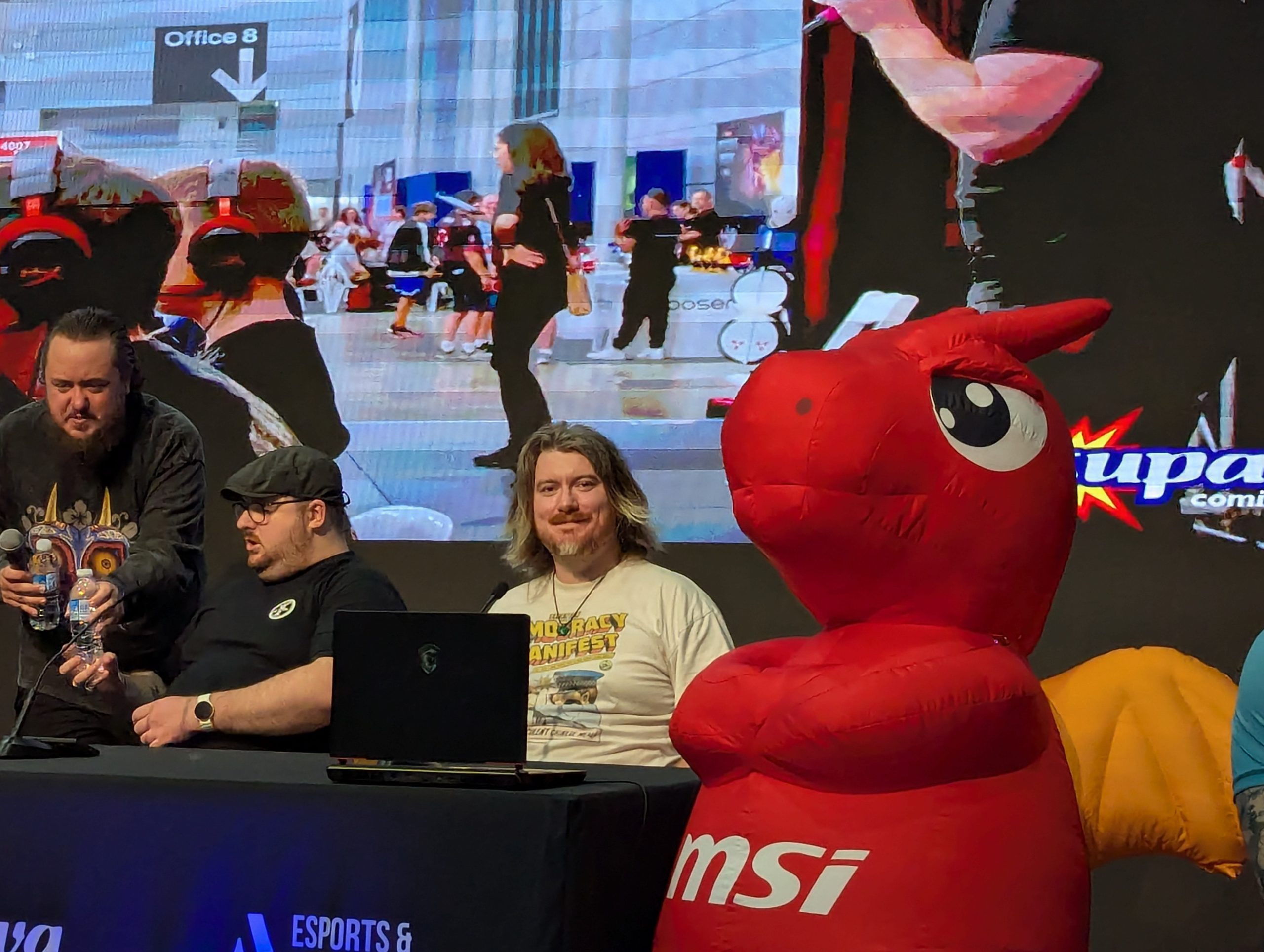
In April, I was invited to speak on a panel at Supanova, this time on the Gold Coast, Qld, AU – I had previously spoken on the same panel topic at the Brisbane Supanova in 2024, and had enjoyed the experience, so I was very keen to go back again, and I don’t often go to the gold coast, so I took the opportunity to make a weekend of it.
Supanova isn’t the biggest convention, but it does feel like a “family reunion” of sorts for the few times I’ve been. It’s my fourth in total, having gone in the early 2010s, and I do find it to be a comfortable vibe. Whereas in PAX Aus or previously Gencon (RIP), I have so much to do that I can’t get it all done (mostly board gaming and arcade), Supanova seems to be mostly cosplay, artists and celebrity meet & greets. I attended for 1 of the 2 available days, and comfortably did everything i wanted to do in 6 hours.
Mind you, I did some low effort cosplay so wasn’t stopped much, and as someone with low disposable income I did not spend much time shopping, which I imagine is a huge draw, as there were a lot of unique stores selling every nerdy thing you can imagine.
my cosplay skill might be a crime, but what is the charge?
I enjoyed talking on the panel as well – it’s my second time covering “getting started in streaming” as a topic, but this time I put forward and hosted a panel that was kind of a scrum session of streaming ideas. Rather than just offering simple advise, I was joined by Applejackeroni, Desmondeus, Echosong and GryphonxxDemon to listen to the audience’s ideas of what they wanted to stream, toss it around a bit and offer our opinions of what parts work, what to avoid and suggestions on how to build on the given idea, so that the streamer stands out in a crowded space.
Our panel was part of Aus Esports & Gaming’s “The Tour”, which organised panels at a lot of different events around this time of year.
Given the fact that our panel was slotted in to compete with the cosplay finale, we were pleasantly surprised to find the retention of our very modest audience was quite high, with every audience member offering feedback and ideas, exactly what I was hoping for. I definitely want to repeat the same panel at future events, and hopefully the audience interaction at this one plays well into our future. Big thanks to Aus Esports & Gaming for having us there as panelists!
And so it begins. I’ve built this site as both a portfolio, as well as helpful instructions for the random information I have to push out to the world. I am hoping to use the site as a outpouring of my ADHD brain. Expect information regarding gaming, content creation, homelab creation. In a way, it’s a bit selfish because I often forget information, and have to search for it again online, so documenting it here should give me a repository to refer to when i inevitably forget the steps to get what I did (I refactor a lot), with poor backup techniques.
I’m hoping that as a nice bonus, my documentation of my own traversed information provides some help for others who stop by. Especially with what I perceive as the rise of homelabs – hosting your own version of online services such as media and web servers (so meta!).
I personally have found the crazy amount of data out there that makes it a nightmare to find one good solution, but I’m at a point now where I have enough knowledge to get something half-working, so it’s time to record what I have as I learn to improve.